Initially, "Depot" is a web-based e-commerce application developed with Ruby on Rails 7 following the tutorial from the book Agile Web Development with Rails 7. In this post, I describe the developed project, my experience, challenges, and some of the tools used to build this project.
Agile Web Development with Rails 7
Agile Web Development with Rails 7 teaches, step by step, how to create a complete application with Ruby on Rails. The book covers the development of an online store, integrating JavaScript, email delivery, asynchronous tasks with Active Job, and real-time features with Action Cable. In addition, it also presents other resources and techniques such as testing and internationalization. With a practical and progressive approach, it is ideal both for beginners and for developers who want to improve their skills with the framework. It is an excellent guide to mastering Rails and its most recent features.
Depot: A Web-Based Online Store
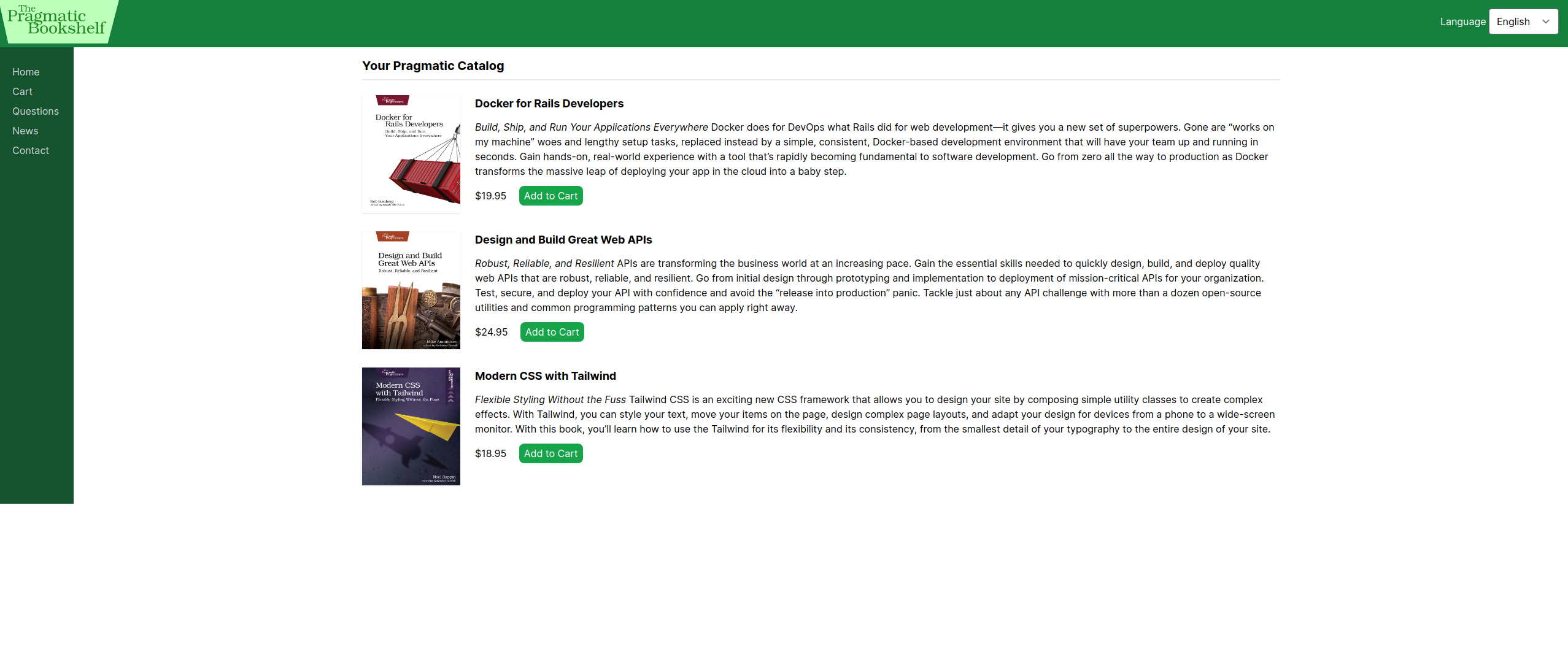
Depot, as mentioned in the introduction, is a virtual store application developed as part of a Rails learning tutorial. The project developed following the tutorial is available in the repository Learning-storage on my GitHub profile. It was inspired by the website The Pragmatic Bookshelf and serves as an excellent example of how to structure a complete application with multiple features.
Depot presents some of the main features of an online store, such as:
- Product catalog with detailed display.
- Order and shopping cart management.
- Integration with an email delivery system.
- Order list.
- Interactive interface for customers.
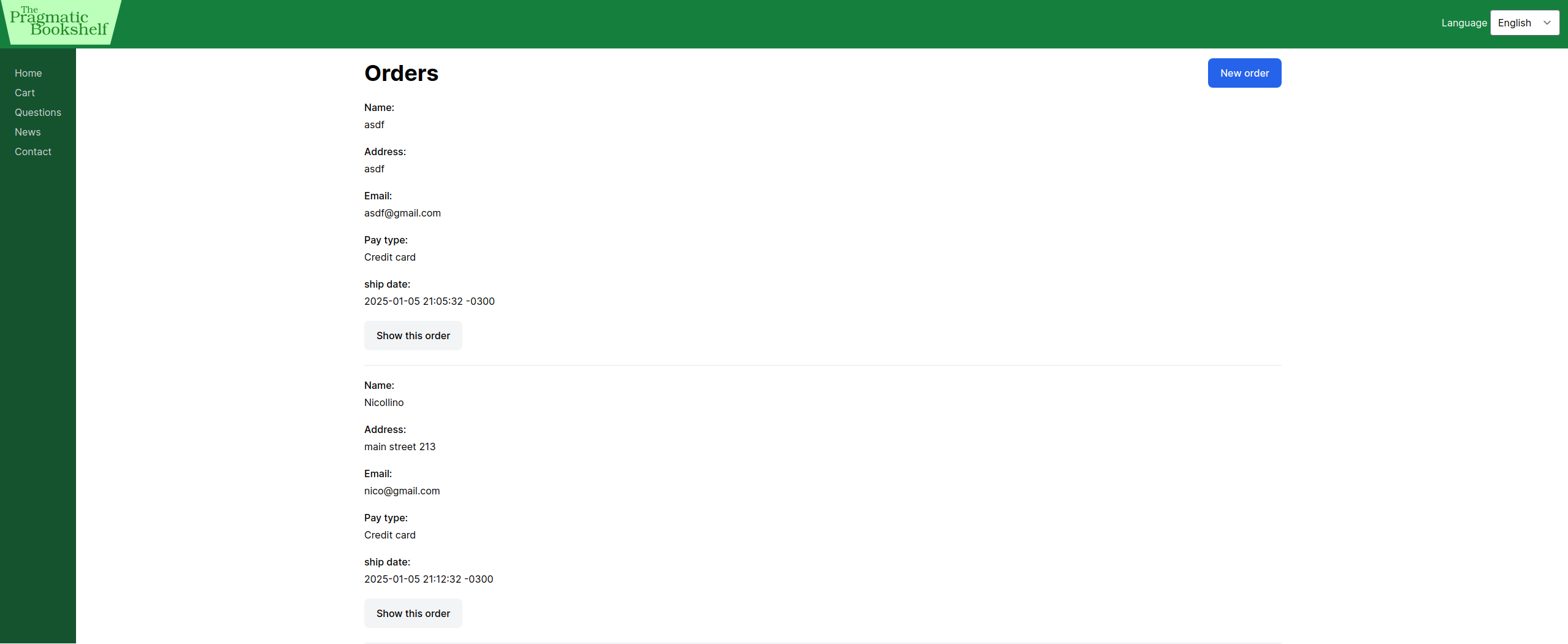
Depot was built to explore fundamental concepts of the Rails framework and modern tools. This project is excellent for those who want to learn about web application development with Ruby on Rails and explore practical and modern features in a controlled learning environment, and in the future a new version of this book will be released, but covering version 8 of Ruby on Rails.
My Experience
Developing this virtual store was a rewarding experience. The book allowed me to get closer to the Ruby on Rails framework, enabling me to learn fundamental concepts such as MVC architecture, ORM, and the use of concerns. In addition, it provided a practical introduction to the Ruby language, covering topics such as data types, arrays, hashes, and methods. The highlight of the book is its didactic approach: clear and objective explanations, followed by code and practical challenges to consolidate the acquired knowledge.
Another important milestone was my first experience using Docker to deploy the application. Until then, I had only used hosting platforms such as Heroku and Render. During development, SQLite was used as the database, while the deploy was performed with PostgreSQL.
Among the highlighted tools, Action Text was used to offer greater freedom of customization to the client, especially in product descriptions. In addition, I had my first experience with Action Cable, implementing real-time features such as the dynamic update of the store whenever a product is added, edited, or removed. I also explored Stimulus to make the checkout form more dynamic, adjusting the displayed fields according to the selected payment method.
The use of I18n (internationalization) was another discovery in this project. This feature allowed adding support for English and Spanish, making the application more accessible. I configured translations to handle specific formats for dates, currencies, and custom messages in different contexts of the application. This practice improved usability and accessibility.
Concerns were another valuable tool that I learned to use during the project. With them, I was able to extract shared logic between different models and controllers, keeping the code clean and reusable. This approach brought greater organization to the code, especially when working with common functionalities.
There was also an improvement in the application of the MVC architecture and the ORM pattern. It is important to more clearly separate responsibilities between models, controllers, and views, keeping each part focused on its specific purpose. In the ORM context, I explored the capabilities of Active Record to deal with complex queries, associations, and validations, greatly simplifying data manipulation.
Finally, email configuration was done with Action Mailer, combined with Active Job, a tool I had already used before. An example is my tweet scheduling project, "Scheduled Tweets", where I used Active Job and Sidekiq to manage background job queues. The versatility of this framework is incredible.
Challenges
In this topic, I will present two challenges that I completed while developing the project following the book: one at a more basic level and another more advanced. The book contains several other challenges such as calculating how many times a part of the site was visited, writing specific tests, and adding validations, so it would not be feasible to include all of them. This topic also includes a brief description of some tools, concepts, and the functioning of the developed algorithm.
-
Challenge 1: After creating tables in the database using migrations, examine the tables directly by running bin/rails dbconsole.
Querying database information through the command line by running "rails dbconsole". This command allows communication with the application database directly from the terminal.
n-colas@n-colas-VirtualBox:~/Development/Learning-storage$ rails dbconsole
SQLite version 3.45.1 2024-01-30 16:01:20
Enter ".help" for usage hints.
sqlite> .mode line
sqlite> SELECT id, title, price FROM products;
  id = 1
title = Docker for Rails Developers
price = 19.95

  id = 2
title = Design and Build Great Web APIs
price = 24.95

  id = 3
title = Modern CSS with Tailwind
price = 18.95
sqlite>
By executing the SQL command SELECT id, title, price FROM products; in the terminal, it is possible to obtain data from three specific attributes of the products table registered in the store: the identifier (id), the title (title), and the price (price). The products table contains other parameters, such as description (description), image URL (image_url), and locale (locale), but the SQL query was configured to return only the first three parameters. In this way, it is possible to see that the database works and allows querying and data manipulation.
-
Challenge 2: Implement product decrement in the cart and update the cart using Hotwire.
Hotwire: A set of technologies designed to build interactive web applications with high performance, minimizing the dependency on heavy JavaScript on the client side. It is composed of three main tools:
- Turbo: Replaces the need for custom JavaScript for partial page updates, using techniques such as Turbo Frames and Turbo Streams to deliver interactivity directly from the server.
- Stimulus: A lightweight framework to add dynamic behavior to HTML elements, making the code more organized and keeping client-side logic simple and declarative.
- Strada: A resource that connects the web front-end to native applications, allowing hybrid interactions between both environments.
Partials Partials in Ruby on Rails are reusable view files that help avoid code repetition. They allow you to extract snippets of HTML and Ruby that repeat in different parts of the application, making the code cleaner and more modular. Partials are loaded with the render method, which can be used to insert a partial into another view or layout. The name of a partial file usually starts with an underscore (_), such as _form.html.erb, to indicate that it is part of a larger view.
Functionality of the decrement feature
The destroy method in the line_items_controller is mainly responsible for reducing the quantity of items in the cart or removing them completely when the quantity reaches 1. This logic ensures that the cart state is always correctly updated, both for decrements and full deletions. The method also uses Turbo Stream for dynamic updates, and supports HTML redirects and JSON responses for greater flexibility.
# controllers/line_items_controller.rb

def destroy
  if @line_item.quantity > 1
    @line_item.update(quantity: @line_item.quantity - 1)
  else
    @line_item.destroy
  end

  respond_to do |format|
    format.turbo_stream
    format.html { redirect_to store_index_url }
    format.json { head :no_content }
  end
end
The destroy.turbo_stream.erb file is used to dynamically update the user interface. When an item is completely removed from the cart, the `_cart` partial is rendered again, showing the updated list of cart items. If only the quantity is reduced, the cart is updated with the new item quantity. In both cases, informative messages are displayed to the user, detailing the action that was performed.
# views/line_items/destroy.turbo_stream.erb
<% if @line_item.destroyed? %>
  <%= turbo_stream.replace 'cart', partial: 'layouts/cart', locals: { cart: @cart } %>
  <%= turbo_stream.replace 'notice', partial: 'store/notice', locals: { notice: "The '#{@line_item.product.title}' was successfully destroyed." } %>
<% else %>
  <%= turbo_stream.update 'cart', partial: 'layouts/cart', locals: { cart: @cart } %>
  <%= turbo_stream.replace 'notice', partial: 'store/notice', locals: { notice: "Only one '#{@line_item.product.title}' was successfully destroyed." } %>
<% end %>
The _cart.html.erb file, located in views/layouts, defines how the cart is displayed in the main interface. It checks whether the cart contains items to determine whether the content should be rendered or if an empty container should be displayed. This approach ensures that the interface remains consistent regardless of the current cart state.
# views/layouts/_cart.html.erb
<% if cart and not cart.line_items.empty? %>
  <div id="cart" class="bg-white rounded p-2">
    <%= render @cart %>
  </div>
<% else %>
  <div id="cart"></div>
<% end %>
The _cart.html.erb file, located in views/carts, defines the detailed structure of the cart. It includes the list of added items, the cart total, and buttons to empty the cart or proceed to checkout. These elements allow for a complete and intuitive interaction for the user.
# views/carts/_cart.html.erb
<div id="<%= dom_id cart %>">
  <h2 class="font-bold text-lg mb-3">
    <%= t('.title') %>
  </h2>

  <table class="table-auto">
  <%= render cart.line_items %>

    <tfoot>
      <tr>
        <th class="text-right pr-2 pt-2" colspan="3">Total:</th>
        <td class="text-right pt-2 font-bold border-t-2 border-black">
          <%= number_to_currency(cart.total_price) %>
        </td>
      </tr>
    </tfoot>
  </table>

  <div class="flex mt-1">
    <%= button_to t('.empty'), cart, method: :delete, class: 'ml-4 rounded-lg py-1 px-2 text-white bg-green-600' %>

    <% if @order.nil? %>
      <%= button_to t('.checkout'), new_order_path(locale: I18n.locale), method: :get, class: 'ml-4 rounded-lg py-1 px-2 text-black bg-green-200' %>
    <% end %>
  </div>
</div>
The _line_item.html.erb file defines how each individual cart item is displayed. It shows details such as quantity, product title, total price, and a button to remove the item. This dynamic layout ensures that users can easily interact with the cart products.
# views/line_items/_line_item.html.erb
<div id="<%= dom_id line_item %>">
  <% if line_item == @current_item %>
    <tr class="line-item-highlight">
  <% else %>
    <tr>
  <% end %>
    <td class="text-right"><%= line_item.quantity %>×</td>
    <td class="pr-2">
      <%= line_item.product.title %>
    </td>
    <td class="text-right font-bold">
      <%= number_to_currency(line_item.total_price) %>
    </td>
    <td>
      <%= button_to 'destroy', line_item, method: :delete, class: 'rounded-lg py-1 px-2 text-white bg-green-600' %>
    </td>
  </tr>
</div>
Result
General functionality of the feature
The destroy method in the line_items_controller is responsible for handling the removal of an item from the cart or reducing the quantity of a product, responding with Turbo Stream, HTML, or JSON. When an item is removed or its quantity is reduced, the views are dynamically updated. The destroy.turbo_stream.erb view updates the cart interface and displays a message, while the _cart.html.erb partial re-renders the cart content, including the updated items. The _line_item.html.erb partial displays each individual cart item and interacts with the controller to reflect UI changes. Turbo Stream allows these updates to occur without reloading the page. The use of Turbo Stream enables dynamic interface updates without requiring a full page reload. This means that after an item is removed or decremented, only the part of the page that needs to be changed (the cart, in this case) will be updated. In addition, a message is displayed informing the user of what occurred: whether the item was completely removed or if its quantity was reduced.
Conclusion
This was undoubtedly the longest and most challenging project I have developed so far, but also the most enriching in terms of learning and professional growth. Throughout the process, I was able to consolidate fundamental concepts of Ruby on Rails, explore modern tools, and improve my web development skills. Following a fully English version of the book also helped improve my command of the language, adding even more value to the experience.
The project introduced me to real-world scenarios, such as using different databases for development and production, integrating real-time features with Action Cable, and adding dynamism to forms with Stimulus. In addition, it was an opportunity to experiment with Docker in deployment, which broadened my perspective on managing production environments. Each challenge faced and overcome throughout this journey was extremely rewarding, providing a solid and practical foundation to continue evolving as a developer.